Appearance
2 - QCar Lab 1
1. Setup
Run through Getting Started to power up the QCar and run through some of the hardware tests to verify it is working.
Remote Desktop into the QCar.
Create a subdirectory (use your NSID) for you to work in and change into that directory:
bash
mkdir <nsid>
cd <nsid>
2. Sensor Interfacing
Sensor Interfacing guides students through the process of acquiring data and calculating the statistical properties used by the sensor fusion lab.
Review 008_sensor_noise.pdf for background material regarding Sensor Noise.
Save the code in Appendix A as
sensor_interfacing.py. Examine the code to get an understanding of how to access the QCar IMU sensors. For example, theQCarclass can be found in thepal.products.qcarPython library located in/home/nvidia/Documents/Quanser/0_libraries/python.
2.1 Sensor Interfacing
Robotic systems make use of Micro Electro-Mechanical Systems (MEMS) to sense information related to the rigid body. Categorized as interoceptive sensors, these include accelerometers, gyroscopes, encoders, voltage sensors, temperature sensors, etc. Autonomous vehicles use these sensors to complement the kinematic properties of the system and estimate motion using sensor fusion techniques.
The objective of this lab is to understand how to visualize sensor data and the type of information it measures within a self-driving car. Sensors being looked at for this skills activity are:
- Accelerometers (x, y, z axis) m/s^2
- Gyroscope (x, y, z axis) rad/s
In
Section Aof the code, selectread.In this mode, the QCar will move along a counterclockwise arc for 2.5 seconds and then a clockwise arc for 2.5 seconds, so make sure there is about 2 metres of space in front of the QCar.
Run the script:
bash
python sensor_interfacing.py- Accelerometer and Gyroscope data should be gathered for five seconds:
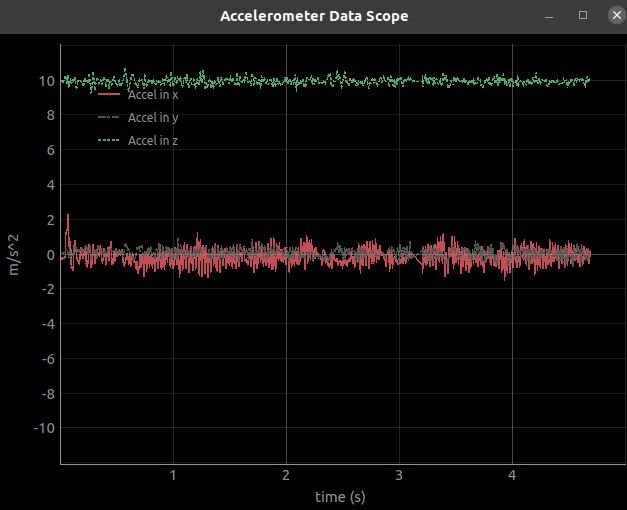
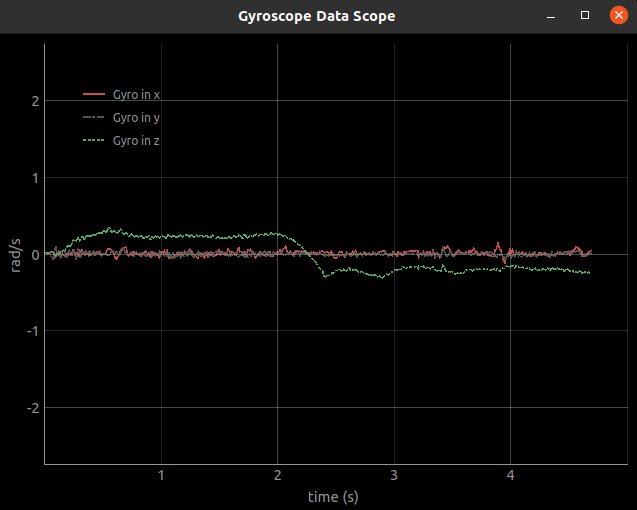
- Capture the two graphs to include in your Lab Report. Discuss in your Lab Report what each element of the two graphs is representing and if they make sense.
2.2 Statistical Modeling
In
Section Aof the code, selectsensor_stats.Run the script (the QCar should remain stationary):
bash
python sensor_interfacing.py- Accelerometer and Gyroscope data should be gathered for five seconds (as the QCar is stationary, should not see much variation):
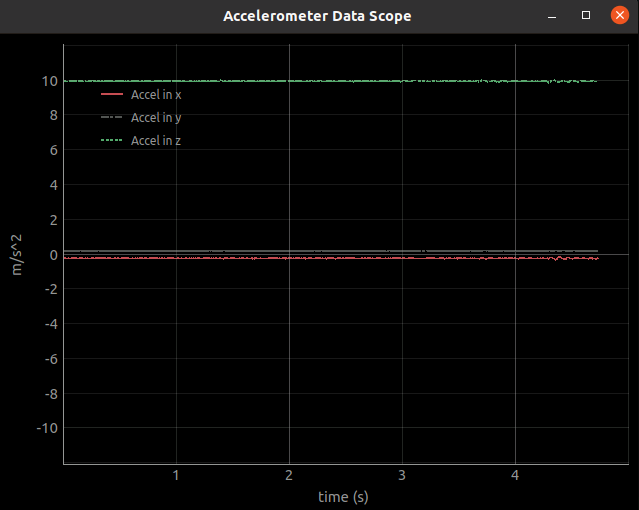
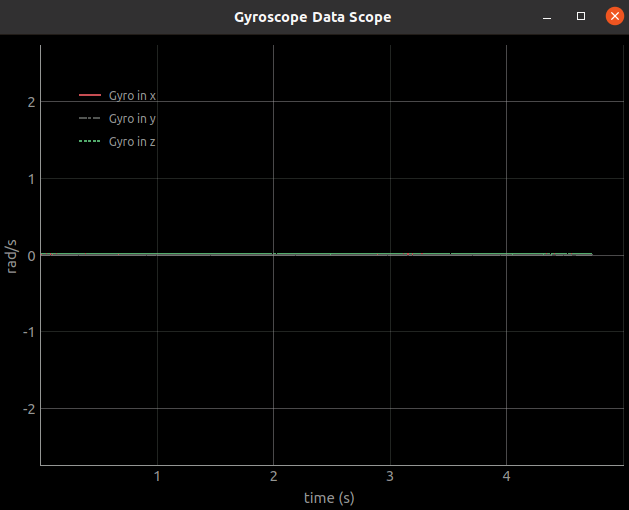
- The Mean and Variance of six readings are displayed similar to the following, capture and include in your Lab Report, identifying what each of the six readings represents:

- After "Press any key to continue...", two additional graphs should be displayed:
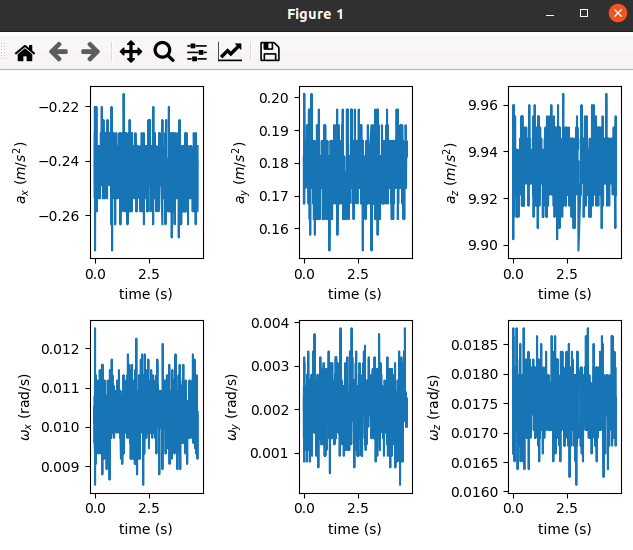
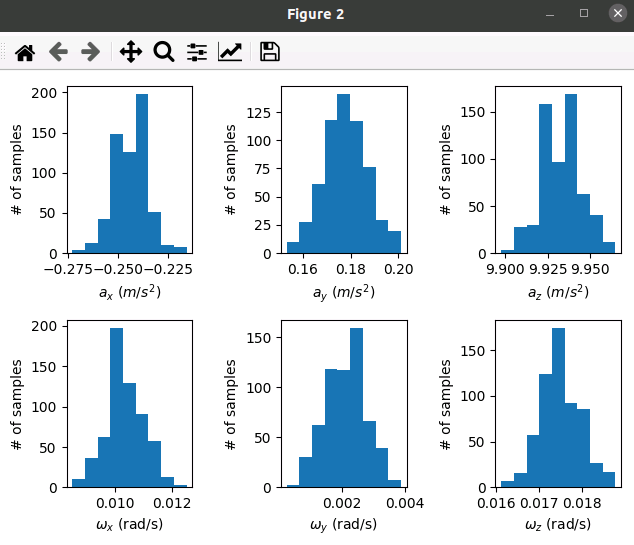
- Capture these additional graphs to include in your Lab Report. Comment in your Lab Report if the values are what your were expecting.
3. State Estimation
The objective of the state estimation lab guide is for students to develop an understanding of different state estimation techniques and their design considerations. Prior to starting this lab, please read through the following concept documents:
3.1 Setup
Save the code in Appendix B as
state_estimation.py.Place the QCar is a large enough space as it will be driving in approximately a 2 metre diameter counter-clockwise circle.
Run the program:
bash
python state_estimation.pyIt should ask you "do you want to recalibrate?(y/n)", answer with "y", this recalibrates the LIDAR to the current environment.
After a few moments, the QCar should start moving for 20 seconds and a plot of "QCar State Estimation" similar to the one below should be display:
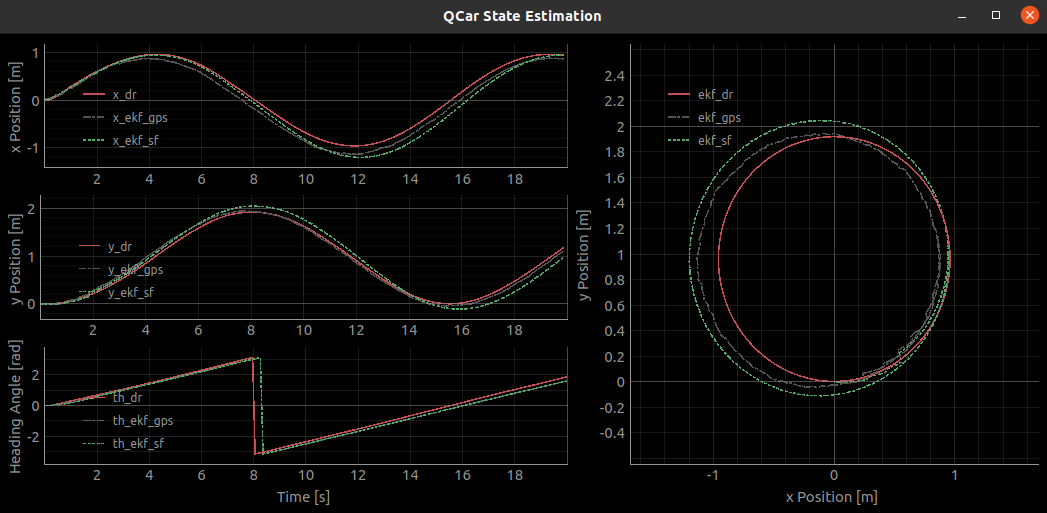
- On the right, three different paths are plotted:
- ekf_dr
- ekf_gps
- ekf_sf
Copy the plot and include in your Lab Report.
Measure the actual diameter of the circle that the QCar moved, compare to the three different plotted paths, and discuss in your Lab Report how each compares to the actual path travelled.
3.2 ekf_dr
Examine
state_estimation.py. What does "dr" stand for?Document how "ekf_dr.prediction()" works.
The "Motion Model" makes reference to "Kinematic Bicycle Model":
- Looking at the code, where is the "reference frame"
- Provide a diagram showing the model
- Provide the "proper" mathematical equations used in the motion estimation (i.e., not Python code)
3.3 ekf_gps
Examine
state_estimation.py. Given GPS does not work indoors, what is being used for the "GPS" data?Document how "ekf_gps.prediction()" works, especially compared to "ekf_dr".
3.4 ekf_sf
Examine
state_estimation.py. What does "sf" stand for?Document how "ekf_sf.prediction()" works, especially compared to "ekf_gps".
Appendix A - sensor_interfacing.py
python
# -- -- -- -- -- -- -- -- -- -- -- -- -- -- -- -- -- -- -- -- -- -- -- -- -- --

#region : File Description and Imports
"""
sensor_interfacing.py

Skills acivity code for sensor interfacing lab guide.
Students will read sensor information and characterize the noise of the IMU in
the QCar.
Please review Lab Guide - Sensor Interfacing PDF
"""

import matplotlib.pyplot as plt
import numpy as np
import time

from pal.products.qcar import QCar, IS_PHYSICAL_QCAR
from pal.utilities.stream import BasicStream , Timeout
from pal.utilities.scope import MultiScope, Signal
from threading import Thread

if not IS_PHYSICAL_QCAR:
    import qlabs_setup
    qlabs_setup.setup()

Signal.maxChunks = 1500
#endregion

# -- -- -- -- -- -- -- -- -- -- -- -- -- -- -- -- -- -- -- -- -- -- -- -- -- --

#region : SensorInterfacing Class Setup

class sensorInterfacing():
    def __init__(self, taskRate,specifiedSamples):

        # QCar DAQ configuration
        self.readRate = int(taskRate) #Hz
        self.samples  = int(specifiedSamples)
        self.mode     = "read"

        # Configure QCar properties
        self.myQCar = QCar(frequency = self.readRate, readMode = 1)

        # Variable for saving sensor readings
        self.accelerometerData = np.zeros((3))
        self.gyroscopeData     = np.zeros((3))
        self.plotData = np.zeros((self.samples,6))

        self.time = np.zeros((int(specifiedSamples)))

        # Define scopes for plotting
        txt = "Accelerometer Data Scope"
        self.accelPlot = MultiScope(title=txt, rows=1, cols=1, fps=taskRate)
        self.accelPlot.addAxis(row = 0,col= 0,
                            timeWindow=int(self.samples*(1/self.readRate)),
                            yLabel='m/s^2',
                            xLabel='time (s)')

        self.accelPlot.axes[0].attachSignal(name = 'Accel in x')
        self.accelPlot.axes[0].attachSignal(name = 'Accel in y')
        self.accelPlot.axes[0].attachSignal(name = 'Accel in z')
        self.accelPlot.axes[0].yLim = (-11, 11)

        txt = "Gyroscope Data Scope"
        self.gyroPlot = MultiScope(title=txt,rows=1, cols=1, fps=taskRate)

        self.gyroPlot.addAxis(row =0, col = 0,
                            timeWindow=int(self.samples*(1/self.readRate)),
                            yLabel='rad/s',
                            xLabel='time (s)')

        self.gyroPlot.axes[0].attachSignal(name = 'Gyro in x')
        self.gyroPlot.axes[0].attachSignal(name = 'Gyro in y')
        self.gyroPlot.axes[0].attachSignal(name = 'Gyro in z')
        self.gyroPlot.axes[0].yLim = (-2.5, 2.5)


    # Timing function used to send timestamp to sigmoid generator.
    def elapsedTime(self,startTime):
        return time.time()-startTime

    def sensor_read(self):
        t0       = time.time()
        loopTime = self.samples*(1/self.readRate) # Simulation Time
        print("Sim time: ",loopTime)
        self.timeStamp = 0

        # Run the data logging only for the length of time specified
        i = 0
        while i < self.samples:
            if self.mode == "read":
                if self.timeStamp < int(loopTime/2):
                    self.myQCar.write(throttle=0.075, steering=0.5)
                if self.timeStamp >= int(loopTime/2):
                    self.myQCar.write(throttle=0.075, steering=-0.5)


    # ============  SECTION B - Sensor Reading and Data Parsing =============
            self.timeStamp = self.elapsedTime(t0)

            # Quanser's implementation for parsing out the IMU information
            self.myQCar.read() # Read sensor data from the QCar

            self.accelerometerData = self.myQCar.accelerometer
            self.gyroscopeData     = self.myQCar.gyroscope

            self.plotData[i,0:3]   = self.accelerometerData
            self.plotData[i,3:6]   = self.gyroscopeData
            self.time[i]           = self.timeStamp

            # Data sent to scope class for visualization
            self.accelPlot.axes[0].sample(self.timeStamp,
                                [self.accelerometerData[0],
                                self.accelerometerData[1],
                                self.accelerometerData[2]].copy())

            self.gyroPlot.axes[0].sample(self.timeStamp,
                                [self.gyroscopeData[0],
                                self.gyroscopeData[1],
                                self.gyroscopeData[2]].copy())

            i += 1

        self.myQCar.write(throttle=0, steering=0)

    def sensor_stats(self):

        # ========== SECTION C - Statistical Properties ==========
        mu = np.zeros(6)
        var = np.zeros(6)

        # Quanser's implementation for calculating miu and variance
        for i in range(6):
            mu[i] = self.plotData[:,i].mean()
            var[i] = self.plotData[:,i].var()

        print("Mean: ", mu)
        print("Variance: ",var)

        input('Press any key to continue...')

        # Quanser's implementation for plotting sensor characteristics
        fig1, ax1 = plt.subplots(2,3)
        fig2, ax2 = plt.subplots(2,3)

        for i in range(3):
            # ===== Plot each signal over time
            ax1[0,i].plot(self.time, self.plotData[:,i])
            ax1[1,i].plot(self.time, self.plotData[:,i+3])
            # ===== Histogram for each signal
            ax2[0,i].hist(self.plotData[:,i], bins=9)
            ax2[1,i].hist(self.plotData[:,i+3], bins=9)

        ax1[0,0].set(xlabel='time (s)', ylabel=r'$a_x$ ($m/s^2$)')
        ax1[0,1].set(xlabel='time (s)', ylabel=r'$a_y$ ($m/s^2$)')
        ax1[0,2].set(xlabel='time (s)', ylabel=r'$a_z$ ($m/s^2$)')
        ax1[1,0].set(xlabel='time (s)', ylabel=r'$\omega_x$ (rad/s)')
        ax1[1,1].set(xlabel='time (s)', ylabel=r'$\omega_y$ (rad/s)')
        ax1[1,2].set(xlabel='time (s)', ylabel=r'$\omega_z$ (rad/s)')

        ax2[0,0].set(xlabel=r'$a_x$ ($m/s^2$)', ylabel='# of samples')
        ax2[0,1].set(xlabel=r'$a_y$ ($m/s^2$)', ylabel='# of samples')
        ax2[0,2].set(xlabel=r'$a_z$ ($m/s^2$)', ylabel='# of samples')
        ax2[1,0].set(xlabel=r'$\omega_x$ (rad/s)', ylabel='# of samples')
        ax2[1,1].set(xlabel=r'$\omega_y$ (rad/s)', ylabel='# of samples')
        ax2[1,2].set(xlabel=r'$\omega_z$ (rad/s)', ylabel='# of samples')

        fig1.tight_layout()
        fig2.tight_layout()
        plt.show()


    def start(self, mode = "read"):

        if mode == "read":
            mainThread = Thread(target=self.sensor_read)
            mainThread.start()

            while mainThread.is_alive():
                self.accelPlot.refresh()
                self.gyroPlot.refresh()

            time.sleep(15)


        if mode == "sensor_stats":
            self.mode = mode
            mainThread = Thread(target=self.sensor_read)
            mainThread.start()

            while mainThread.is_alive():
                self.accelPlot.refresh()
                self.gyroPlot.refresh()

            self.sensor_stats()

#endregion

# -- -- -- -- -- -- -- -- -- -- -- -- -- -- -- -- -- -- -- -- -- -- -- -- -- --

#region : Main Loop
def main():
    try:
        '''
        INPUTS
        taskRate = Int The frequency (Hz) at which the read/write operation
                will be performed.
        specifiedSamples = Int Number of samples saved for statistical analysis of
                        sensor data.
        '''
        # ========= SECTION A - Control mode ===========
        sensorLab = sensorInterfacing(taskRate = 120,
                            specifiedSamples = 600)

        ''' Students decide the activity they would like to do in the
        sensor interfacing lab
        List of current activities:
        - read (sensor interfacing skills activity)
        - sensor_stats (sensor characterization skill activity)
        '''
        sensorMode = "read"
        sensorLab.start(mode = sensorMode)
    finally:
        if not IS_PHYSICAL_QCAR:
            qlabs_setup.terminate()

        input('Experiment complete. Press any key to exit...')

#endregion

# -- -- -- -- -- -- -- -- -- -- -- -- -- -- -- -- -- -- -- -- -- -- -- -- -- --

#region : Run
if __name__ == '__main__':
    main()
#endregionAppendix B - state_estimation.py
python
# -- -- -- -- -- -- -- -- -- -- -- -- -- -- -- -- -- -- -- -- -- -- -- -- -- --

#region : File Description and Imports

"""
state_estimation.py

Skills activity code for state estimation lab guide.
Students will implement three types of state estimation techniques for
localizing the QCar in space.
Please review Lab Guide - State Estimation PDF
"""

import numpy as np
from threading import Thread
import time
import signal

from pal.products.qcar import QCar, QCarGPS, IS_PHYSICAL_QCAR
from pal.utilities.scope import MultiScope
from pal.utilities.math import wrap_to_pi


if not IS_PHYSICAL_QCAR:
    import qlabs_setup
    qlabs_setup.setup(
        initialPosition=[0, 0, 0],
        initialOrientation=[0, 0, 0]
    )
    calibrate = False
else:
    calibrate = 'y' in input('do you want to recalibrate?(y/n)')

#================ Experiment Configuration ================
# ===== Timing Parameters
# - tf: experiment duration in seconds.
# - controllerUpdateRate: control update rate in Hz. Shouldn't exceed 500

tf = 20
controllerUpdateRate = 100

# Used to enable safe keyboard triggered shutdown
global KILL_THREAD
KILL_THREAD = False
def sig_handler(*args):
    global KILL_THREAD
    KILL_THREAD = True
signal.signal(signal.SIGINT, sig_handler)

#endregion

# -- -- -- -- -- -- -- -- -- -- -- -- -- -- -- -- -- -- -- -- -- -- -- -- -- --

class QcarEKF:

    def __init__(self, x0, P0, Q, R):
        # Nomenclature:
        # - x0: initial estimate
        # - P0: initial covariance matrix estimate
        # - Q: process noise covariance matrix
        # - R: observation noise covariance matrix
        # - xHat: state estimate
        # - P: state covariance matrix
        # - L: wheel base of the QCar
        # - C: output matrix

        self.L = 0.257

        self.I = np.eye(3)
        self.xHat = x0
        self.P = P0
        self.Q = Q
        self.R = R

        self.C = np.array([
            [1, 0, 0],
            [0, 1, 0],
            [0, 0, 1]
        ])

    # ==============  SECTION A -  Motion Model ====================
    def f(self, X, u, dt):
        # Kinematic Bicycle Model:
        # - X = [x, y, theta]
        # - u[0] = v (speed in [m/s])
        # - u[1] = delta (steering Angle in [rad])
        # - dt: change in time since last update

        return X + dt * u[0] * np.array([
            [np.cos(X[2,0])],
            [np.sin(X[2,0])],
            [np.tan(u[1]) / self.L]
        ])


    # ==============  SECTION B -  Motion Model Jacobian ====================
    def Jf(self, X, u, dt):
        # Jacobian for the kinematic bicycle model (see self.f)

        return np.array([
                [1, 0, -dt*u[0]*np.sin(X[2,0])],
                [0, 1, dt*u[0]*np.cos(X[2,0])],
                [0, 0, 1]
        ])


    # ==============  SECTION C -  Motion Model Prediction ====================
    def prediction(self, dt, u):

        # Update Covariance Estimate
        F = self.Jf(self.xHat, u, dt)
        self.P = F@self.P@np.transpose(F) + self.Q

        # Update State Estimate
        self.xHat = self.f(self.xHat, u, dt)
        # Wrap th to be in the range of +/- pi
        self.xHat[2] = wrap_to_pi(self.xHat[2])

        return


    # ==============  SECTION D -  Measurement correction ====================

    def correction(self, y):

        # Precompute terms that will be used multiple times
        H = self.C
        P_times_HTransposed = self.P @ np.transpose(H)

        S = H @ P_times_HTransposed + self.R
        K = P_times_HTransposed @ np.linalg.inv(S)

        # Wrap z for th to be in the range of +/- pi
        z = (y - H@self.xHat)
        if len(y) > 1:
            z[2] = wrap_to_pi(z[2])
        else:
            z = wrap_to_pi(z)

        self.xHat += K @ z
        # Wrap th to be in the range of +/- pi
        self.xHat[2] = wrap_to_pi(self.xHat[2])

        self.P = (self.I - K@H) @ self.P

        return


class GyroKF:

    def __init__(self, x0, P0, Q, R):
        # Nomenclature:
        # - x0: initial estimate
        # - P0: initial covariance matrix estimate
        # - Q: process noise covariance matrix
        # - R: observation noise covariance matrix
        # - xHat: state estimate
        # - P: state covariance matrix
        # - A: state matrix
        # - B: input matrix
        # - C: output matrix

        self.I = np.eye(2)
        self.xHat = x0
        self.P = P0
        self.Q = Q
        self.R = R

        # State Space Representation Matrices
        self.A = np.array([
            [0, -1],
            [0, 0]
        ])
        self.B = np.array([
            [1],
            [0]
        ])
        self.C = np.array([
            [1, 0]
        ])


    # ==========  SECTION F -  Gyro Heading Prediction  ================
    def prediction(self, dt, u):
        # - dt: change in time since last prediction
        # - u: most recent gyroscope measurement

        # Discretize A:
        Ad = self.I + self.A*dt

        self.xHat = Ad@self.xHat + dt*self.B*u
        self.P = Ad@self.P@np.transpose(Ad) + self.Q

    # ==========  SECTION G -  GPS Heading Correction  ================
    def correction(self, y):
        # - y: heading measurement from GPS

        P_times_CTransposed = self.P @ np.transpose(self.C)

        S = self.C @ P_times_CTransposed + self.R
        K = P_times_CTransposed @ np.linalg.inv(S)

        z = y - self.C@self.xHat
        # Wrap z to be in the range of +/- pi
        z = wrap_to_pi(z)

        self.xHat += K @ z
        # Wrap th to be in the range of +/- pi
        self.xHat[0] = wrap_to_pi(self.xHat[0])

        self.P = (self.I - K@self.C) @ self.P
        return


def controlLoop():
    #region controlLoop setup
    global KILL_THREAD
    # used to limit data sampling to 10hz
    countMax = controllerUpdateRate / 10
    count = 0
    #endregion

    #region : Estimators Setup
    # Initial estimates for QCar state and covarience matrix (P)
    x0 = np.zeros((3,1))
    P0 = np.eye(3)

    # Estimator 1: EKF performing dead reckoning
    ekf_dr = QcarEKF(
        x0=x0,
        P0=P0,
        Q=np.diagflat([0.01, 0.01, 0.01]),
        R=None
    )

    # Estimator 2: EKF combining the kinematic bicycle model with GPS data
    ekf_gps = QcarEKF(
        x0=x0,
        P0=P0,
        Q=np.diagflat([0.01, 0.01, 0.01]),
        R=np.diagflat([0.2, 0.2, 0.1])
    )

    # Estimator 3: Cascaded (E)KF
    # 3.a Kalman filter fusing gyroscope data with GPS heading data
    kf = GyroKF(
        x0=np.zeros((2,1)),
        P0=np.eye(2),
        Q=np.diagflat([0.00001, 0.00001]),
        R=np.diagflat([.1])
    )

    # 3.b EKF combining bicycle model with GPS pos. and KF heading estimate
    C_combined = np.eye(3)
    C_headingOnly = np.array([[0, 0, 1]])
    R_combined = np.diagflat([0.8, 0.8, 0.01])
    R_headingOnly = np.diagflat([0.01])

    ekf_sf = QcarEKF(
        x0=x0,
        P0=P0,
        Q=np.diagflat([0.0001, 0.0001, 0.0001]),
        R=R_combined
    )
    #endregion

    #region : Main Control Loop
    qcar = QCar(readMode=1, frequency=controllerUpdateRate)
    gps = QCarGPS(initialPose=x0[:,0],calibrate=calibrate)

    with qcar, gps:
        t0 = time.time()
        t = 0
        while (t < tf) and (not KILL_THREAD):
            #region : Loop timing update
            tp = t
            t = time.time() - t0
            dt = t-tp
            #endregion

            #region : QCar Input / Output Update
            # Read from QCar sensors
            qcar.read()
            speed_tach = qcar.motorTach
            th_gyro = qcar.gyroscope[2]

            # Update and write QCar control values
            # - u: throttle [%]. Shouldn't exceed 0.2 percent
            # - delta: steering angle [radians]. Shouldn't exceed pi/6.
            u = 0.1
            delta =  np.pi/12
            qcar.write(u, delta)
            #endregion

            # ======= Section For enabling Kalman Filter Estimators =======
            ekf_dr.prediction(dt, [speed_tach, delta])
            ekf_gps.prediction(dt, [speed_tach, delta])
            ekf_sf.prediction(dt, [speed_tach, delta])
            kf.prediction(dt, th_gyro)

            #region : Correction Update for Filters
            if gps.readGPS():
                # ==========  SECTION E -  Measurement Update  ================

                # Collect new GPS readings
                x_gps = gps.position[0]
                y_gps = gps.position[1]
                th_gps = gps.orientation[2]

                # Correction for estimator 2 using GPS
                y = np.array([
                    [x_gps],
                    [y_gps],
                    [th_gps]
                ])
                ekf_gps.correction(y)

                ekf_sf.C = C_combined
                ekf_sf.R = R_combined
                # C orrection for estimator 3.a using GPS

                kf.correction(th_gps)

                # Correction for estimator 3.b using GPS and heading estimate
                y = np.array([
                    [x_gps],
                    [y_gps],
                    [kf.xHat[0,0]]
                ])

                ekf_sf.correction(y)

            else:
                # Correction for 3.b using only heading estimate
                y = np.array([[kf.xHat[0,0]]])
                ekf_sf.C = C_headingOnly
                ekf_sf.R = R_headingOnly
                ekf_sf.correction(y)

            #endregion

            #region Update Scopes with New Data Samples
            count += 1
            if count >= countMax:
                # x position estimates
                scope.axes[0].sample(t, [
                    ekf_dr.xHat[0,0],
                    ekf_gps.xHat[0,0],
                    ekf_sf.xHat[0,0]
                ])
                # y position estimates
                scope.axes[1].sample(t, [
                    ekf_dr.xHat[1,0],
                    ekf_gps.xHat[1,0],
                    ekf_sf.xHat[1,0]
                ])
                # Heading angle estimate
                scope.axes[2].sample(t, [
                    ekf_dr.xHat[2,0],
                    ekf_gps.xHat[2,0],
                    ekf_sf.xHat[2,0]
                ])
                # x-y view of estimated trajectory
                scope.axes[3].sample(t, [
                    [ekf_dr.xHat[0,0], ekf_dr.xHat[1,0]],
                    [ekf_gps.xHat[0,0], ekf_gps.xHat[1,0]],
                    [ekf_sf.xHat[0,0], ekf_sf.xHat[1,0]],
                ])

                #biasScope.axes[0].sample(t, [kf.xHat[0]])
                #biasScope.axes[1].sample(t, [kf.xHat[1]])

                count = 0
            #endregion
            continue

    #endregion
    return

# -- -- -- -- -- -- -- -- -- -- -- -- -- -- -- -- -- -- -- -- -- -- -- -- -- --

#region : Setup and run experiment
if __name__ == '__main__':

    #region : Setup Scopes
    if IS_PHYSICAL_QCAR:
        fps = 10
    else:
        fps = 30

    '''
    # Scope for displaying estimated gyroscope bias
    biasScope = MultiScope(
        rows=2,
        cols=1,
        title='Heading Kalman Filter',
        fps=fps
    )
    biasScope.addAxis(
        row=0,
        col=0,
        xLabel='Time [s]',
        yLabel='Heading Angle [rad]',
        timeWindow=tf
    )
    biasScope.axes[0].attachSignal()
    biasScope.addAxis(
        row=1,
        col=0,
        xLabel='Time [s]',
        yLabel='Gyroscope Bias [rad/s]',
        timeWindow=tf
    )
    biasScope.axes[1].attachSignal()
    '''

    # Scope for comparing performance of various estimator types
    scope = MultiScope(rows=3, cols=2, title='QCar State Estimation', fps=fps)

    scope.addAxis(row=0, col=0, timeWindow=tf, yLabel='x Position [m]')
    scope.axes[0].attachSignal(name='x_dr')
    scope.axes[0].attachSignal(name='x_ekf_gps')
    scope.axes[0].attachSignal(name='x_ekf_sf')

    scope.addAxis(row=1, col=0, timeWindow=tf, yLabel='y Position [m]')
    scope.axes[1].attachSignal(name='y_dr')
    scope.axes[1].attachSignal(name='y_ekf_gps')
    scope.axes[1].attachSignal(name='y_ekf_sf')

    scope.addAxis(row=2, col=0, timeWindow=tf, yLabel='Heading Angle [rad]')
    scope.axes[2].xLabel = 'Time [s]'
    scope.axes[2].attachSignal(name='th_dr')
    scope.axes[2].attachSignal(name='th_ekf_gps')
    scope.axes[2].attachSignal(name='th_ekf_sf')

    scope.addXYAxis(
        row=0,
        col=1,
        rowSpan=3,
        xLabel='x Position [m]',
        yLabel='y Position [m]',
        xLim=(-1.5, 1.5),
        yLim=(-0.5, 2.5)
    )
    scope.axes[3].attachSignal(name='ekf_dr')
    scope.axes[3].attachSignal(name='ekf_gps')
    scope.axes[3].attachSignal(name='ekf_sf')
    #endregion

    #region : Setup control thread, then run experiment
    controlThread = Thread(target=controlLoop)
    controlThread.start()

    try:
        while controlThread.is_alive() and (not KILL_THREAD):
            MultiScope.refreshAll()
            time.sleep(0.01)
    finally:
        KILL_THREAD = True
    #endregion
    if not IS_PHYSICAL_QCAR:
            qlabs_setup.terminate()

    input('Experiment complete. Press any key to exit...')
#endregion